
Your best employee never sleeps, never forgets a follow-up, and can read a thousand documents before your coffee cools. That is the promise of AI agents for business. The catch most businesses either overhype them or never get past the demo.
This guide cuts through the noise. You will learn what AI agents are, how they differ from chatbots and traditional automation, eight real business use cases, what to check before you build, and a practical 30 day plan to launch your first one.
In this article
- What are AI agents?
- AI agent vs chatbot vs automation
- How AI agents work
- 8 real business use cases
- What to check first
- data, security and human review
- Build vs buy
- A 30-day pilot plan
- FAQs
What Are AI Agents for Business?
An AI agent is software that understands a goal, decides what steps are needed, uses your business tools to carry them out, and checks its own progress, all with limited human input.
A normal program follows instructions you wrote in advance. An AI agent is given an outcome (“resolve this customer’s refund request”) and works out the path- read the ticket, check the order, apply the refund policy, issue the refund and reply to the customer. You will also hear the term agentic AI, which describes the same shift AI that does not just answer questions but takes action toward a goal.
The simple test: If the software can decide what to do next and act in your systems, it behaves like an agent. If it only replies with text, it is a chatbot.
AI Agent vs Chatbot vs Automation
Many businesses confuse these three, then buy the wrong one.
| Rule-based automation | Chatbot | AI agent | |
|---|---|---|---|
| How it works | Fixed “if this, then that” rules | Answers questions in conversation | Pursues a goal and chooses its own steps |
| Unexpected input? | No, it breaks | Partly | Yes, it adapts |
| Acts in your systems? | Preset actions only | Rarely | Yes, across multiple tools |
| Best for | Repetitive, predictable tasks | FAQs, first-line support | Multi-step, variable work |
| Example | Send an invoice reminder on day 30 | “What are your opening hours?” | Chase overdue invoices, read replies, agree a payment date, update the ledger |
Do not use an agent where a simple rule works; rules are cheaper and more predictable. Use agents when the work involves messy information, judgment calls, or several tools. Many strong solutions combine all three.
How AI Agents Work
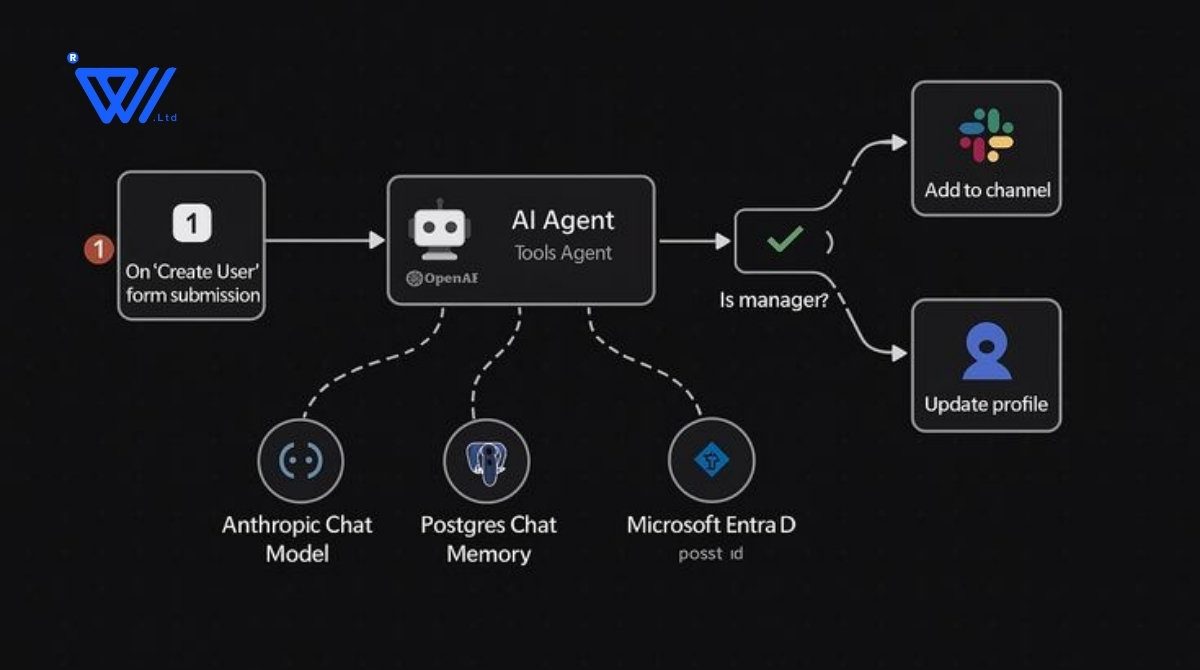
AI agents for business have four core parts:
- A reasoning engine: a large language model (LLM) that reads context, plans and decides.
- Tools: connections to your CRM, ERP, email, database, calendar or internal APIs. Tools turn a smart chatbot into something that gets work done.
- Memory and knowledge: access to your documents, policies and product data, so answers reflect your business.
- Guardrails: limits on what the agent may do, approval steps and audit logs. This separates a demo from a system you can trust.
The loop: understand the goal, plan, act with tools, check the result, then continue or escalate to a human.
8 Real Business Use Cases for AI Agents
1. Customer support resolution
The agent looks up the order, checks courier status, applies your return policy and completes the refund or replacement. Human agents handle only complex cases.
2. Sales lead qualification and follow-up
It reads new inquiries, researches the company, scores the lead against your ideal customer profile, drafts a personalized reply and books a meeting.
3. Finance and invoice processing
Agents extract data from invoices, match them to purchase orders, flag mismatches and chase late payments, making month-end faster and cleaner.
4. HR and recruitment
Screen resumes against role requirements, schedule interviews, answer candidate questions and handle onboarding paperwork.
5. IT helpdesk and internal operations
Password resets, access requests and common troubleshooting are handled end to end, with unusual cases escalated.
6. Marketing and content operations
Research topics, draft content, repurpose one blog into social posts and report on performance, with humans approving what goes live.
7. Data analysis and reporting
Ask in plain language, “Which product lines lost margin last quarter and why?” The agent queries your data and explains the result in business terms.
8. Supply chain and inventory
Monitor stock, predict shortages, compare supplier quotes and raise purchase orders within approved limits.
Where to start with AI agents for business: pick a task that is high-volume, rule-heavy, done by hand today and low-risk if something goes wrong. Support triage, lead qualification and document processing are the most common first wins.
What to Check First: Data, Security and Human Review
1. Data quality and access
An agent is only as good as the information it can reach. If product data is scattered across spreadsheets or policies live in one person’s head, fix that first.
2. Security and privacy
Decide what the agent can see and what it can do. Apply least privilege, check where data is processed and stored, and confirm compliance with rules that apply to you, such as GDPR or local data-protection laws.
3. Human in the loop review
Let the agent act alone on low risk tasks; require human approval for money, legal commitments or sensitive customer communication. Start with more review and loosen it as trust is earned.
4. Clear success metrics
Define “working” up front tickets resolved without escalation, response time, cost per lead, hours saved, error rate.
5. Failure planning
AI can be wrong with confidence. Plan for logging of every action, easy rollback, fallback to a human, and regular testing on real edge cases. Good design does not assume perfection; it limits the damage when imperfection happens.
Build vs Buy: Which Route Is Right?
| Buy a ready made tool | Build a custom AI agent | |
|---|---|---|
| Speed to start | Days | Weeks |
| Upfront cost | Low (subscription) | Higher (development) |
| Workflow fit | Generic | Tailored to your process |
| Integration | Supported apps only | Deep, including legacy and internal tools |
| Data control | Depends on vendor | Full control over hosting and access |
| Best when | Your need is common | Your workflow is unique, regulated or core to the business |
Buy for commodity tasks; build for anything that differentiates you or touches sensitive systems. If you go custom, work with an experienced AI development company that also offers AI integration services, so the agent connects safely to your existing software instead of sitting in isolation.
A 30-Day Plan to Launch Your First AI Agent
- Week 1: Choose and define — Pick one process with clear volume and rules. Map current steps and time taken. Set success metrics and a baseline.
- Week 2: Prepare — Gather documents, data and policies. List the tools and permissions required. Define approval points and escalation triggers.
- Week 3: Build and test — Build a working version limited to that process. Test on real historical cases, especially messy ones, and record how often a human had to step in.
- Week 4: Pilot and measure — Run it live on a small share of real work with human review on. Compare against your baseline, then expand, adjust or stop.
The rule that saves projects: start small, prove value, then scale. One agent that reliably saves ten hours a week beats an ambitious system that never launches.
AI agents for business are the next step in how companies run from software that waits for instructions to software that finishes the job. The winners will be the companies that pick a real problem, start small, build in safeguards and learn fast. Your first agent does not have to be perfect. It has to be useful, safe and measurable.
Ready to Build Your First AI Agent?
At iWebwiser, we design and develop custom AI agents for business and integrate them safely with the tools your team already uses. We start with a focused pilot so you see results before you scale.
Explore our AI Development Services or contact our team to discuss your use case.